Windchill is blank when trying to open a Java page
Windchill window is blank when trying to access a Java applet page
Example of pages that is run with Java:
Process Manager for Change Objects
Vault Configuration
Internet Explorer does not detect Java Runtime Environment 64-bit
Start by checking the following:
That the installed version of Java is compatible with the Windchill version - check PTC Platform Support
That the Windchill URL has been added as a trusted site in Java
That the Windchill URL has been added a trusted site in the browser
If it still does not work, try the following:
1. Install the latest Java Runtime Environment JRE for 32-bit
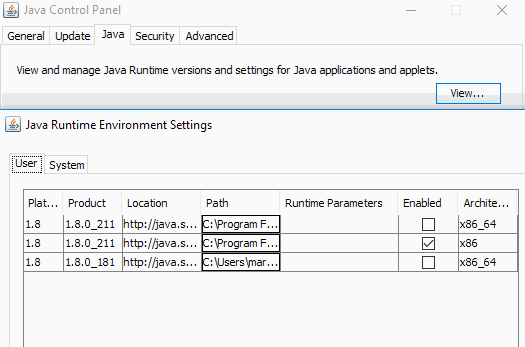
2. Disable Java JRE 64-bit under Control Panel -> Java - > Java -> View
Windchill window is blank when trying to access a Java applet page
Example of pages that is run with Java:
Process Manager for Change Objects
Vault Configuration
Internet Explorer does not detect Java Runtime Environment 64-bit
Start by checking the following:
That the installed version of Java is compatible with the Windchill version - check PTC Platform Support
That the Windchill URL has been added as a trusted site in Java
That the Windchill URL has been added a trusted site in the browser
If it still does not work, try the following:
1. Install the latest Java Runtime Environment JRE for 32-bit
2. Disable Java JRE 64-bit under Control Panel -> Java - > Java -> View