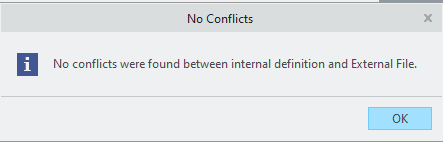
Unable to update resticted value field with message: "No conflicts were found between internal defenition and External File"
Cannot update resticted value file in Creo Parametric with message:
"No conflicts were found between internal defenition and External File"
To do go through the following steps:
1. Click Tools >  Parameters. The Parameters dialog box opens.2. Click Tools > Conflict Report. The report identifies the difference between the definition of the restricted parameters in the model and the restriction definition file.3. If a conflict is reported, click Tools > Update Restriction Definition.
So the new values are not read in and can be picked in the drop-down lists...
When openeing Creo Parametric the Warning comes up:
- Opening a model fails with "The External File for Restricted Parameters was not loaded because of wrong format"
Dupicate values in restricted-value file
- Remove duplicated symbols from customer external file
Example file, check that the values in ENUM field is not duplicated, e.g. note yellow marked is a duplicate:
{ Name = GEN_TOL
Type = string
Default = 'ISO 2768-mK'
Enum = { 'ISO 2768-mK','ISO 2768-1 m', '-', 'ISO 2768-v', 'ISO 2768-1 f', 'ISO 2768-1 c', 'DIN 16901', 'DIN 16901-110', 'DIN 16901-120', 'DIN 16901-130', 'DIN 16901-140', 'DIN 16901-150', 'DIN 16901-160', 'DIAB Fine', 'DIAB Average', 'DIAB Course', 'DIAB Very Course', 'DIN 16901-120 '}
},
Remove the duplicate value and save the external restriction value file
{ Name = GEN_TOL
Type = string
Default = 'ISO 2768-mK'
Enum = { 'ISO 2768-mK','ISO 2768-1 m', '-', 'ISO 2768-v', 'ISO 2768-1 f', 'ISO 2768-1 c', 'DIN 16901', 'DIN 16901-110', 'DIN 16901-120', 'DIN 16901-130', 'DIN 16901-140', 'DIN 16901-150', 'DIN 16901-160', 'DIAB Fine', 'DIAB Average', 'DIAB Course', 'DIAB Very Course' }
},
Cannot update resticted value file in Creo Parametric with message:
"No conflicts were found between internal defenition and External File"
To do go through the following steps:
Parameters. The Parameters dialog box opens.So the new values are not read in and can be picked in the drop-down lists...
When openeing Creo Parametric the Warning comes up:
- Opening a model fails with "The External File for Restricted Parameters was not loaded because of wrong format"
Dupicate values in restricted-value file
- Remove duplicated symbols from customer external file
Example file, check that the values in ENUM field is not duplicated, e.g. note yellow marked is a duplicate:
{ Name = GEN_TOL
Type = string
Default = 'ISO 2768-mK'
Enum = { 'ISO 2768-mK','ISO 2768-1 m', '-', 'ISO 2768-v', 'ISO 2768-1 f', 'ISO 2768-1 c', 'DIN 16901', 'DIN 16901-110', 'DIN 16901-120', 'DIN 16901-130', 'DIN 16901-140', 'DIN 16901-150', 'DIN 16901-160', 'DIAB Fine', 'DIAB Average', 'DIAB Course', 'DIAB Very Course', 'DIN 16901-120 '}
},
Remove the duplicate value and save the external restriction value file
{ Name = GEN_TOL
Type = string
Default = 'ISO 2768-mK'
Enum = { 'ISO 2768-mK','ISO 2768-1 m', '-', 'ISO 2768-v', 'ISO 2768-1 f', 'ISO 2768-1 c', 'DIN 16901', 'DIN 16901-110', 'DIN 16901-120', 'DIN 16901-130', 'DIN 16901-140', 'DIN 16901-150', 'DIN 16901-160', 'DIAB Fine', 'DIAB Average', 'DIAB Course', 'DIAB Very Course' }
},